
Norton 360 Backup Problems Data Recovery
Zero Alpha Data Recovery provides professional data recovery services for customers who have experienced problems with Norton 360 Cloud Backup. We accept mail-in jobs Australia-wide and can assist when backups fail, files are missing, or data cannot be restored.
Norton 360 Backup Common Problems
- Backup completed successfully but files are missing.
- Unable to restore files from Norton Cloud Backup.
- Accidentally deleted files before confirming they were backed up.
- Cloud backup contains outdated file versions.
- Backup failed due to internet connection problems.
- Norton reports backup errors or synchronisation failures.
- Files backed up but cannot be downloaded or opened.
- Corrupted documents restored from backup.
- External hard drive backup destination no longer detected.
- Backup jobs stuck or never complete.
- Ransomware encrypted files before a valid backup was created.
- Backup retention settings removed older file versions.
- Windows profile changes causing backup locations to be lost.
- Hard drive failure before backup could complete.
- SSD failure resulting in loss of files that were not included in the backup set.
- Accidental formatting of a drive believed to be fully backed up.
- Account access problems preventing access to cloud backups.
- Missing photos, videos, documents or business records after a restore.
- Cloud storage quota exceeded causing backups to stop.
- Damaged or corrupted backup catalog information.
ARestore.exe: No backup sets found (N360_BACKUP)
ARESTORE.EXE is a program commonly installed with Norton backup products and is used to restore files from backup archives. It allows users to browse available backups and recover selected files, folders, or previous versions of data. The file itself does not usually contain the backup data but acts as the restore application that accesses stored backup sets. Finding ARESTORE.EXE on a system is often an indication that Norton backup software was previously installed and used.
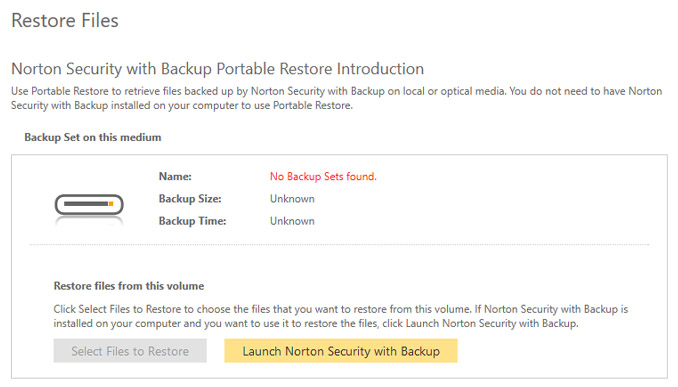 03Jun26: This customer mailed in a hard drive from Queensland because the USB connection failed. It had a Norton backup on the drive that they wanted recovered. They took this hard drive to a local computer technican who was able to get the norton backup software off it but they could not restore the data. They contacted Norton support who had been trying to assist for 18 months before the owner delivered it to Zero Alpha.
If you run the Norton restore file Arestore.exe it pops up with an error message that says No backup sets found. Backup Size: Unknown. Backup Time: Unknown.
The solution is actually really simple. the backup db "catalog file" is corrupt. The good news is that there is no encryption, and each file just contains a norton backup header with the full filepath, and then the raw file content. This means the "catalog file" is not actually needed. it can be removed (or renamed), and then the ARestore.exe file will scan and locate all the files in the backup set.
I tested this by manually copying some of the files over into a virtual drive (to simulate being at filesystem root), and all 16 files were successfully recovered.
Norton 360 Backup file structure:
- "NB20" signature
- Little endian 16-byte file path length in characters
- File path in utf16 (so for a path length of 0x48 we have 0x90 path bytes)
- Single byte, unknown purpose so far. padding unlikely since file starts have been unaligned (so far).
- The raw unencrypted file content. trivial to extract with a hex editor, would be very easy to automate extraction and file path recovery with a script. ARestore.exe isn't really needed here.
Solution
"New Volume" F: is the VHDX located at E:\disk.vhdx - this is where I am copying D:\N360_BACKUP\ to.
Once backing up finishes, we will need to:
1. Move subfolders of F:\Root\ into F:\ so they are actually at the drive root.
2. Rename F:\N360_BACKUP\{0E6A1986-7238-4069-A440-2E71103207FD}\backup.@db to
3. Run F:\ARestore.exe
4. Choose to restore all the files to E:\